
How Attackers are Combining ClickFix with Steganography To Evade Security?
Today’s post breaks down a silent attack: how ClickFix and steganography work together to trick users into executing malware that never touches disk.

Attackers don’t always invent something new.
Sometimes, they simply combine old techniques in clever ways.
Just enough to slip past security filters.
This recent attack is a perfect example.
It blends ClickFix (social engineering that tricks users into executing commands themselves) with steganography (hiding malware inside images), resulting in a chain that looks benign at every step but ends with credential theft running entirely in memory.
Let’s break it down.
📝 Background / Context
Modern security stacks are good at spotting known malware files, suspicious downloads, and obvious command-and-control traffic.
So attackers adapt.
Instead of:
Dropping an executable
Writing files to disk
Triggering obvious alerts
They ask a simpler question:
What if the user executes the attack for us—and the malware never exists as a file at all?
That’s where ClickFix and steganography come together.
ClickFix exploits human behavior.
Steganography exploits tooling blind spots.
Together, they form a stealthy and surprisingly effective infection path—especially against well-protected endpoints.
🔥 Attack Flow — Step by Step
Here’s how this attack unfolds from start to finish:
Attacker sends a phishing email with a link > Victim clicks it > A webpage opens in full-screen mode > Mimics a Windows Update screen with instructions.
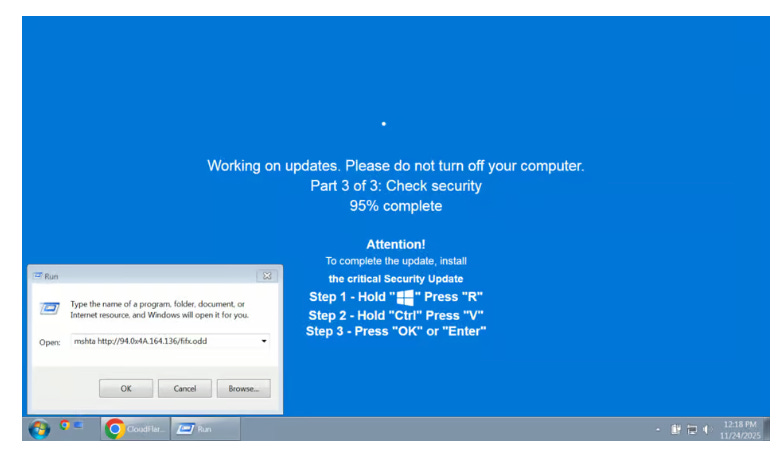
Behind the scenes, JavaScript on the page silently copies a malicious command into the user’s clipboard. The page now asks the user to “complete the update” with three simple steps (see image for easy ref):
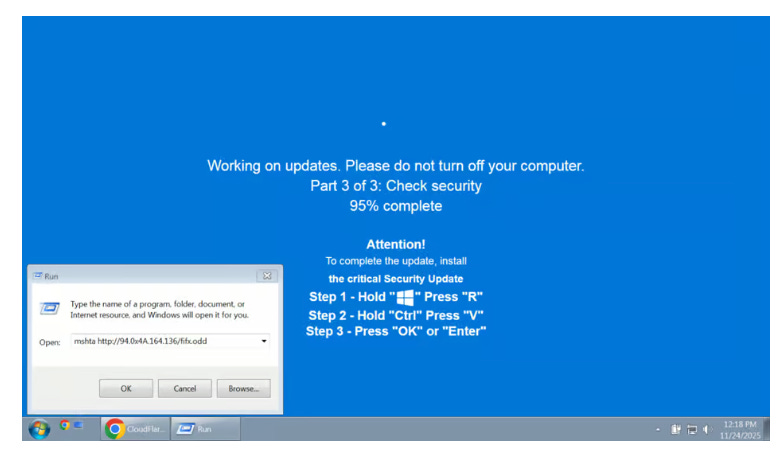
Step 1 says ---> Press Windows key + R (this triggers Windows "run" prompt)
Step 2 says ---> Press “CTRL” key + the letter “V” at the same time (this pastes malicious code from the site’s clipboard)
Step 3 says ---> Press the “Enter” key (this causes Windows to execute the code (via Mshta.exe to download files)The executed command reaches out to the attacker’s server > Downloads a normal looking image. Except that it contains malware hidden inside its pixels!
A loader on the victim’s system extracts the hidden payload > Decrypts it > Stitches the pieces together directly in memory.
The malware now runs entirely in memory > Steals creds, browser data > Sends it back to the attacker. No malware file ever touches disk. No obvious red flags. No detection.
💡 Key Takeaways
Cybersecurity follows a Darwinian loop. Defenders build controls. Attackers adapt around them. Defenders respond. Attackers adapt again. ClickFix + steganography is simply the latest mutation.
Images are an interesting place to hide. A digital image is made up of millions of tiny dots called pixels. Each pixel has numbers that decide how red, green, and blue it looks. Attackers slightly change those numbers, especially the red value, by tiny amounts. The changes are so small that your eyes can’t see any difference.
2) The picture still looks completely normal. But a program knows exactly where to look. It reads those tiny color changes, pulls out the hidden data, and reconstructs the malware. So to antivirus, it’s “just an image.” To the attacker’s loader, it’s a file secretly carrying instructions.
There’s a reason why mshta.exe is used with ClickFix. Mshta.exe is a utility that executes Microsoft HTML Applications (HTA) files. HTAs are standalone applications that execute using the same technology of browser, but outside of the browser. Since it executes outside of browser, attackers use it to bypass browser security settings!
ClickFix attacks in 2025 have made one thing clear: The best attack is the one where the attacker tricks the victim into executing the attack themselves. No exploit chains. No privilege escalation.
Depending on your environment, consider Group Policies (GPO) or registry settings that can restrict execution of PowerShell, mshta.exe, and wscript.exe. Windows group policy restrictions have the option to prevent Windows from executing the “run” command when users hit the Windows key and the “R” key simultaneously.
Run internal phishing tests where users are prompted to copy-paste commands. Teach them: If someone tells you to paste and run something, just do not do it.
📌 Closing Thought
This attack didn’t rely on zero-days.
It didn’t drop obvious malware.
It relied on combining a new technique (ClickFix) with decades old living-off-the-land tools.
Simple, creative tricks can be just as dangerous as advanced exploits.
Hope you learned something new.
What’s the most creative attack variation you’ve seen recently?